


Your labour contract is one of the most important documents you hold as an employee in the UAE.
Your salary, job title, notice period, working hours, leave entitlements, and end-of-service benefits are all defined by what is written in that contract.
If there is a discrepancy between what you were verbally promised and what is actually registered, the MOHRE version is what counts.
The good news is that downloading your labour contract in UAE takes less than five minutes and costs nothing.
This guide walks you through exactly how to do it, what to check once you have it, how to handle common issues, and what your legal rights are in the process.
Your Legal Right to Receive a Labour Contract (Article 8)
Accessing your labour contract is not something you need to ask permission for. It is a legal right.
Under Article 8(1) of Federal Decree-Law No. 33 of 2021 on the Regulation of Labour Relations in the UAE, every employee is entitled to obtain a copy of their employment contract as approved and registered by MOHRE.
Your employer is legally required to submit this contract to MOHRE before your employment begins.
From that point, it belongs to both parties, and you can access it independently, at any time, without notifying your employer.
Why is this important? Because a significant number of employees only discover a problem when they need the contract for something specific.
The job title is different from what was agreed. The basic salary is lower than the offer letter stated. The contract type is wrong.
None of these issues are easy to resolve once they have been sitting unaddressed for months.
Catching them early, when the employment relationship is still early, is always the better approach.
How to Download Your Labour Contract from MOHRE
There are three ways to access your labour contract digitally. All three are free and produce a legally valid PDF.
Method 1: Via the MOHRE Website (Emirates ID)
This is the most commonly used method and works well on any device or browser.
Step 1: Open your browser and go to mohre.gov.ae.
From the top navigation, click “All Services” and then select “View Approved Contract.” Note that “View Approved Contract” is not on the first page after clicking All Services. So, you have to click on the “Next” button to be able to locate it.
Alternatively, to avoid wasting so much. of your time scrolling, time, you can just use the search bar at the left corner to find it quickly. When you locate it, click on it to move to the next stage.
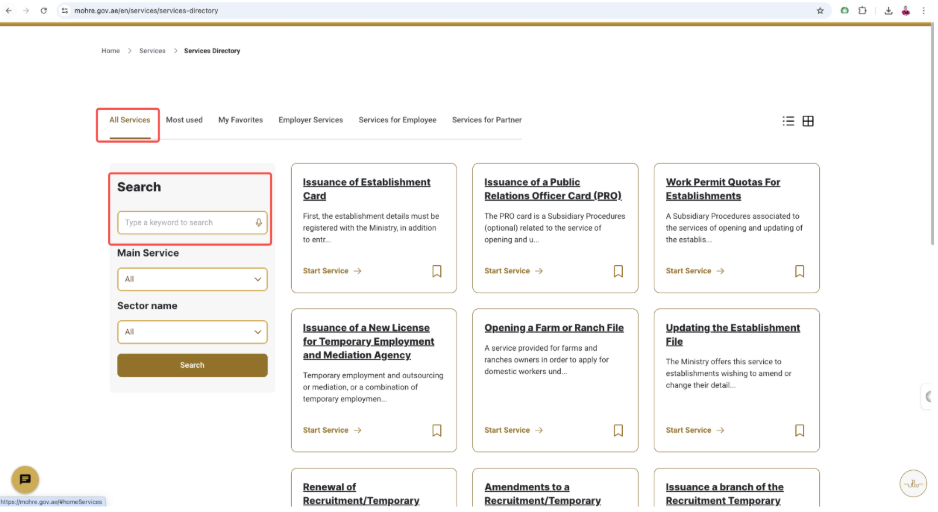
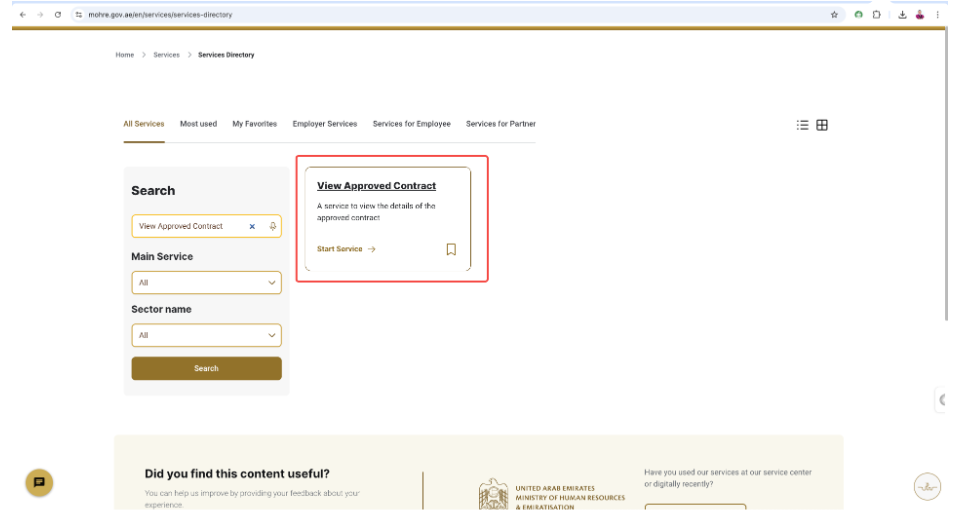
Step 2: Choose “Search by EIDA No”. This is the Emirates ID option. Enter your Emirates ID number in full and click “Request OTP.” A one-time password will be sent to the mobile number that is linked to your Emirates ID.
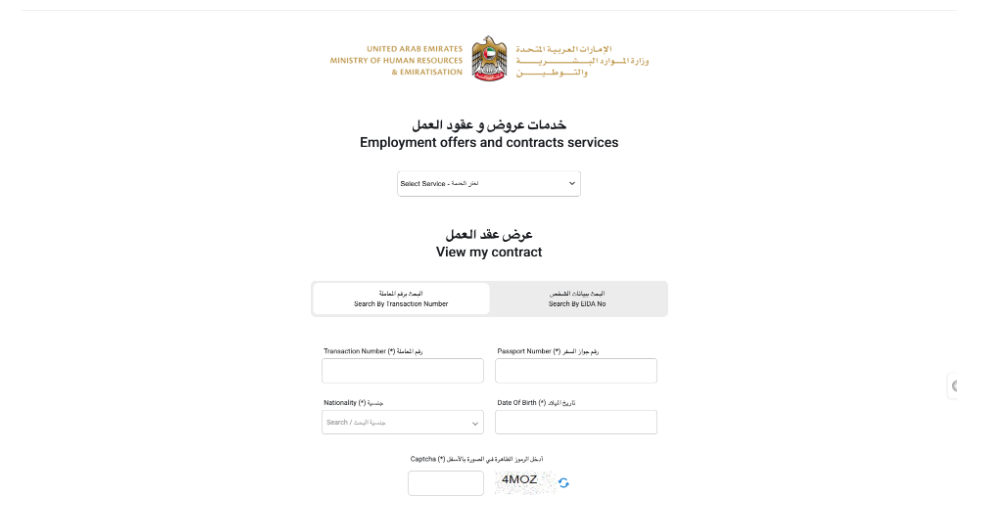
Step 3: Enter the OTP in the field provided, then click “View My Contract.” Your registered labour contract will load on screen. To save it, click “Print” and select “Save as PDF” from the print options. That PDF is your official, legally recognised copy.
If you do not have your Emirates ID handy, you can also search by Transaction Number using your passport number, nationality, and date of birth. Fill in the captcha and click “View My Contract” to proceed.
Method 2: Via the MOHRE Mobile App
The app is the faster option for anyone who needs the contract on their phone, which, practically speaking, is most situations.
Step 1: Download the MOHRE UAE app from the Apple App Store or Google Play Store. It is free and available in both Arabic and English. You can click these links to download directly;
Appstore: https://apps.apple.com/ae/app/mohre-uae/id807379317
Android (Google Play): https://play.google.com/store/apps/details?id=ae.gov.mol&pcampaignid=web_share
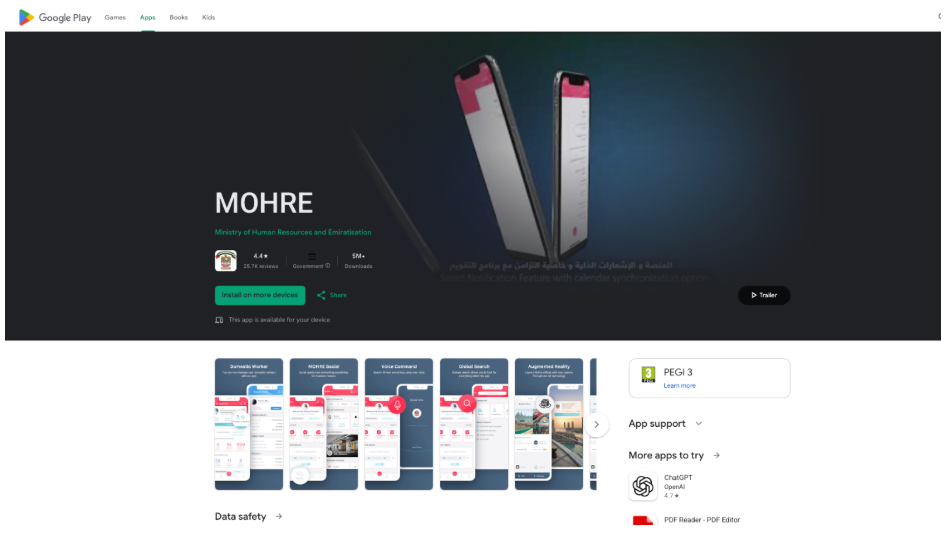
Step 2: Log in using your Emirates ID credentials or UAE Pass, then click on “My Dashboard.”
Step 3: Scroll down to the “Contracts” section. Select the contract you want to view and click “Download PDF” or “Print” to save it directly to your phone. From here, you should be able to access the contract in your mobile (most probably under downloads, or whichever folder you saved it)
Method 3: Downloading Your Labor Contract Through UAE Pass
UAE Pass is the UAE government’s unified digital identity platform, a single login that connects you to most federal and local government services, including MOHRE. If you already have a UAE Pass account, this is often the smoothest method. However, you can easily download it on Appstore or Google Play Store if you don’t have it yet. This is how to go about it:
Step 1: Download the UAE Pass app from the AppStore using this link: https://apps.apple.com/ae/app/uae-pass/id1377158818 or Google Play, if you are using an android device, through this link https://play.google.com/store/apps/details?id=ae.uaepass.mainapp&pcampaignid=web_share, if you do not already have it.
Then register using your Emirates ID, setup your pin (a 4 digits code), and complete the identity verification process.
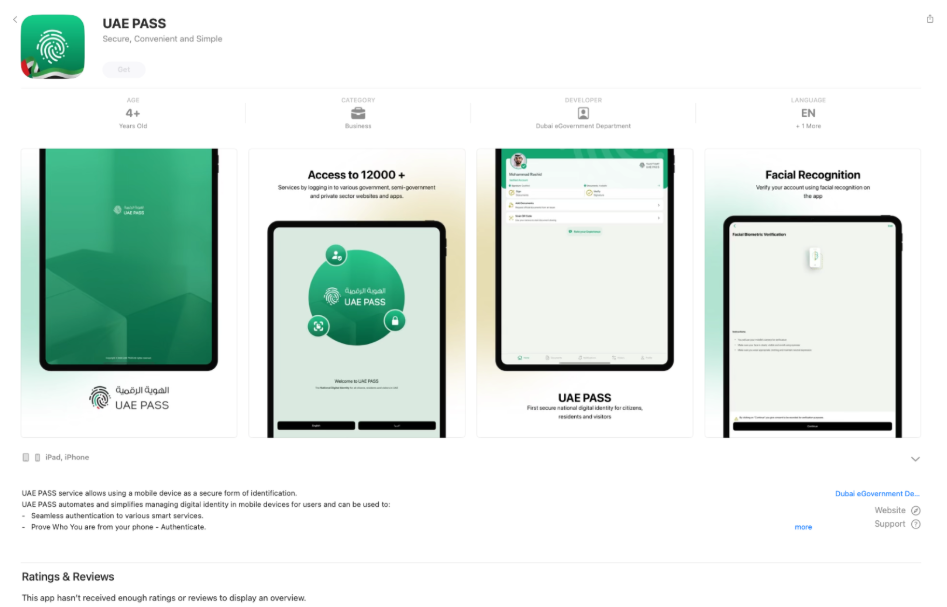
Register using your Emirates ID and complete the identity verification process.
Step 2: Open the MOHRE website or app and select “Login with UAE Pass” when prompted, as shown below:
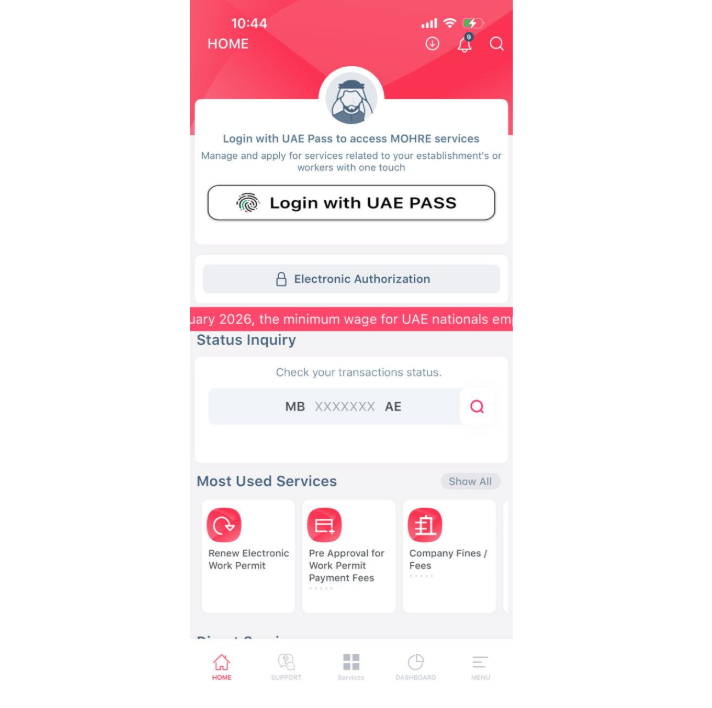
The system will redirect you to the UAE Pass authentication screen, where you approve the login from your UAE Pass app.
Step 3: Once authenticated, navigate to “My Dashboard” within MOHRE and go to the “Contracts” section. Select your contract and download the PDF.
The UAE Pass login method is the most secure option and takes away the need to enter your Emirates ID manually each time. It also gives you seamless access across multiple government platforms using a single verified identity (MOHRE, ICA, DLD, and others).
Troubleshooting Common Problems
“No Record Found”: There are three likely causes. First, your employer may not have uploaded the contract yet this can happen in the first few days of employment.
Second, you may have entered your Emirates ID incorrectly. Third, your company may be registered under a free zone authority rather than MOHRE.
Free zone employees (those working under DMCC, JAFZA, DSO, ADGM, and similar authorities) will not find their contracts on the MOHRE portal. Contact your HR department or the relevant free zone authority directly for access.
OTP Not Received: The OTP goes to the mobile number registered with your Emirates ID — which is not always the number you currently use. If you changed your phone number at any point without updating it on your Emirates ID registration, the OTP will go to the old number. To fix this, visit an ICA service centre or use the ICA Smart Services platform to update your registered mobile number. Once updated, the MOHRE OTP process will work normally.
System Maintenance or Page Not Loading: MOHRE’s portal goes through scheduled maintenance periods, most often during late-night or early-morning hours. If the page will not load or returns an error, try again a few hours later. Switching from a browser to the app, or clearing your browser cache and trying again, resolves most loading issues.
Contract Showing Wrong or Outdated Information: If what you see on MOHRE does not reflect your current role, salary, or employment terms, your first step is to raise it with HR. The employer is responsible for updating your registered contract details through the MOHRE employer portal. If HR is unresponsive or unwilling to correct the record, you can file a formal complaint through MOHRE’s online complaints platform or by calling 800 60. You do not need your employer’s agreement to file a complaint.
Key Details to Verify After Downloading Your Labour Contract
Once you have the PDF, do not just save it and move on. Take ten minutes to go through these specific points.
Basic Salary vs. Total Salary These are two different numbers and the distinction carries real financial consequences. Your basic salary is the fixed monthly amount before any allowances. Your total package may include housing, transport, and other additions on top.
The reason this matters: end-of-service gratuity and overtime payments under UAE Labour Law are both calculated on the basic salary, not the total package. If your basic salary is registered lower than it should be, your end-of-service payout will be calculated on a lower base — and that difference compounds over years of service.
Job Title: The title on your MOHRE contract needs to match what was agreed in your offer letter and what appears on your residence visa. A mismatch here is not just a paperwork issue — it can create complications during visa renewals, professional licence applications, and if an employment ban determination ever becomes relevant.
Notice Period: The minimum notice period under UAE Labour Law is 30 days, but many contracts specify 60 or 90 days. Whichever figure is registered on MOHRE is what applies legally. Check that it matches what you were told, particularly if your offer letter and contract say different things.
Contract Type: Your contract is either fixed-term or unlimited in duration. A fixed-term contract runs to a specific end date, usually tied to your visa validity. An unlimited contract continues until either party ends it with proper notice. The rules around early termination, resignation, and end-of-service entitlements differ between the two. Know which type you are on.
Company Details: Confirm that the company name, trade licence number, and establishment details are all correctly registered. Mistakes in company information — even minor ones — can create delays and complications when you need the contract for visa renewals, government applications, or if a labour dispute arises.
Summary
Your labour contract is the document that protects you — but only if what is registered on MOHRE is accurate. Download it, check it against your offer letter, and flag any discrepancies to HR early.
The MOHRE system is available around the clock, completely free, and produces a legally valid document that is accepted by banks, courts, and government authorities across the UAE.
Always rely on the MOHRE-registered version rather than a copy provided by your employer. In any formal dispute or official process, the MOHRE document is the one that carries weight.
Issues raised early, when both parties are still on reasonable terms, are resolved far more smoothly than those left to surface during a resignation or end-of-service calculation. MOHRE’s helpline at 800 60 is available if your employer fails to cooperate on any correction or update.
Can I download my labour contract for free?
Yes, completely free. There are no charges for accessing, viewing, or downloading your labour contract through the MOHRE website, the MOHRE app, or via UAE Pass. It has always been a free service.
Can I check my labour contract without my employer knowing?
Yes. The MOHRE portal, app, and UAE Pass access method are all independent of your employer. When you view or download your contract, your employer receives no notification of any kind.
Is the MOHRE labour contract PDF legally valid?
Yes. A PDF downloaded directly from the MOHRE platform is a legally recognised document in the UAE. Banks accept it for loan and mortgage applications, immigration authorities accept it for visa purposes, and courts accept it as evidence in labour disputes.
How long does it take for a contract to appear on MOHRE after I join a company?
Your employer is required to register the contract before your employment begins. If it does not appear, allow five to ten working days after completing your joining formalities.
If it still does not show after that, raise it with your HR team immediately. A contract that has not been registered on MOHRE means your employment is not formally activated under UAE labour law, which leaves your protections significantly weakened.
What if the salary shown on my MOHRE contract is lower than what I was offered?
This is a serious issue that needs to be addressed without delay. The salary registered on MOHRE is what the UAE government formally recognises as your pay.
If your actual salary is higher but not reflected on the registered contract, you are in a legally ambiguous position that will work against you in any dispute. Raise it formally with HR first. If nothing changes, file a complaint with MOHRE through their portal or on 800 60.
My employer is in a free zone. Can I still use MOHRE to access my contract?
No. MOHRE only covers mainland-registered companies. If your employer operates under a free zone authority (DMCC, JAFZA, ADGM, DSO, or others), your contract is held by that authority. Contact your HR team or the relevant free zone directly to obtain your copy.
My name or Emirates ID appears incorrectly on the MOHRE contract. What should I do?
Contact your HR or PRO department immediately and ask them to submit a correction request through the MOHRE employer portal. Incorrect personal identification details can affect your visa, salary transfers, and end-of-service calculations. This is not a minor clerical issue — treat it as urgent.
Can I view contracts from previous employers on MOHRE?
Yes. All employment contracts registered under your Emirates ID — including those from previous employers — remain accessible on the MOHRE platform. This is particularly useful if you are calculating past end-of-service gratuity entitlements or need to verify your employment history for a new job application.




Leave a Reply